Smart Home Not Connecting? Here's Why and How To Fix It | 5 Installation Mistakes to Check

Smart home not connecting? 90% of the time it is probably an installation issue, not a product issue. You bought the hub, downloaded the app, and nothing works. Before you blame the product or write that 1-star Shopee review, read this. Nine times out of ten, the problem is how it was installed, not what was installed.
Short answer: If your smart home hub keeps disconnecting, don't assume the hub itself is faulty. Hub placement, Wi-Fi settings, Zigbee interference, concrete walls and poor network planning can all affect reliability. Before replacing the hardware, check whether the system was installed and configured for the actual layout of your home.
Why This Happens So Often in Singapore
Singapore homes have a unique cocktail of connectivity killers. HDB flats are built with reinforced concrete walls that eat wireless signals for breakfast. Condos stack units so close together that Wi-Fi channel congestion from 50 neighbours makes 2.4GHz almost unusable. Landed properties have multiple floors with signal dead zones between them.
So when your smart home hub "doesn't work," it's rarely the hardware. It's the environment it was dropped into, without proper planning.
This is exactly why Home-A-Genius starts every project with a site visit, not a product recommendation. Your home's layout, wall materials, and wireless environment determine what goes where, and that assessment has to happen before a single device gets installed.
The 5 Most Common Installation Mistakes (And How to Fix Them)
Mistake #1: Placing the Hub in the TV Console
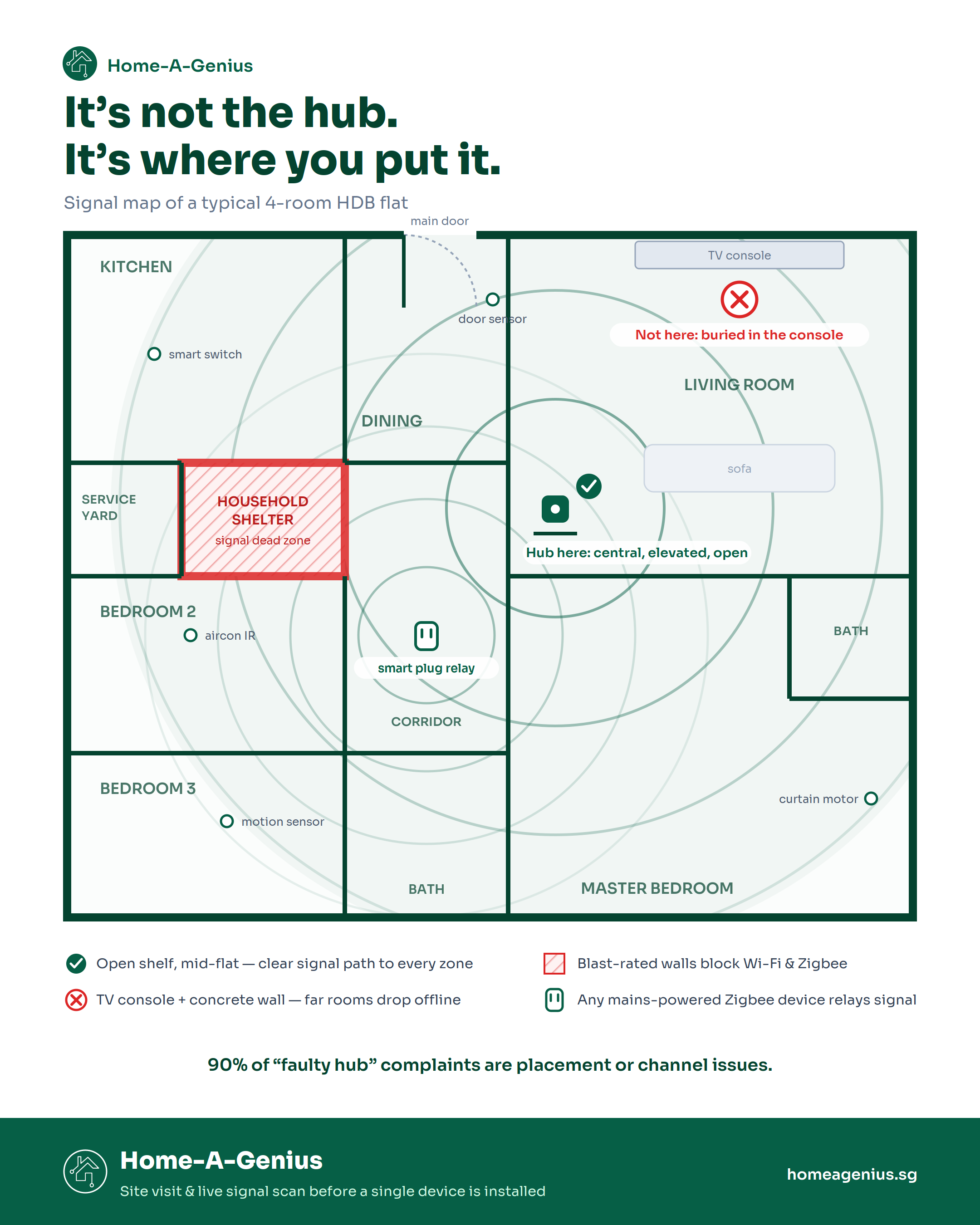
This is the most common one we see. Homeowners unbox the hub, see it needs power, and plug it in next to the router behind the TV console. Problem: your hub is now surrounded by a wooden cabinet, a TV, a soundbar, a router, and possibly a concrete wall on one side.
Zigbee and Wi-Fi signals degrade fast through dense materials. A hub buried inside a TV console in a 4-room HDB can lose connectivity to devices just two rooms away.
The fix: Place the hub in a central, elevated, open location. Top of a bookshelf in the living room works well. If aesthetics matter, a small shelf near the ceiling or inside an open cabinet (not closed) keeps it hidden without killing signal range. In larger HDB units (5-room, EA) or condos with long corridors, consider Zigbee signal repeaters (any mains-powered Zigbee device acts as one, like a smart plug in the hallway).
How Home-A-Genius handles this: During the site visit, the team maps your floor plan and identifies the optimal hub placement based on line-of-sight to all rooms. If one hub can't cover everything, repeater devices are planned into the layout from the start, not added as an afterthought when things break.
Mistake #2: Wrong Wi-Fi Band
Most smart home devices, especially Zigbee hubs that need internet for cloud features, sensors, and cameras, connect via 2.4GHz Wi-Fi. But many Singapore households now use mesh routers (TP-Link Deco, Google Wi-Fi, ASUS ZenWiFi) that auto-steer devices to 5GHz.
5GHz is faster but has shorter range and worse wall penetration, exactly the opposite of what smart home devices need. Your hub connects, works for a day, then drops off because the router kicked it to a band it can't hold.
The fix: Create a dedicated 2.4GHz SSID for your smart home devices. Most mesh routers let you split bands in the settings. Name it something like "Home_SmartDevices" and connect all your IoT devices to that. Your phones and laptops stay on the fast 5GHz band, your smart devices stay on the stable 2.4GHz one.
Pro tip: If you're on a StarHub, Singtel, or M1 issued router and can't split bands, you might need a separate access point. Worth the $40 investment to avoid months of frustration.
Why this matters less with Home-A-Genius: The HAG system runs on a local hub that communicates with devices over Zigbee, which operates independently of your Wi-Fi network. Only the hub itself needs a Wi-Fi connection for remote access. So even if your Wi-Fi is congested, your automations and scenes still fire locally without delay.
Mistake #3: Too Many Devices on One Zigbee Channel
Zigbee is the protocol most professional smart home systems use (including Home-A-Genius). It's reliable, local, and low-power. But here's the thing most people don't know: Zigbee and Wi-Fi share the 2.4GHz spectrum.
If your Wi-Fi router is on Channel 6 and your Zigbee hub is sitting on a channel directly underneath it, they're stepping on each other. In an HDB block where every unit has a router blasting on overlapping channels, this causes intermittent device drops, delayed automations, and phantom "offline" statuses.
The fix: A proper installer will check the Wi-Fi channel environment on-site and set the Zigbee channel to avoid overlap. The safe pairings:
- Wi-Fi Channel 1 → Zigbee 20 or 25
- Wi-Fi Channel 6 → Zigbee 15 or 25
- Wi-Fi Channel 11 → Zigbee 15 or 20
Most hubs default to Zigbee channel 11, which sits directly under Wi-Fi channel 1, one of the busiest Wi-Fi channels. If you DIY'd your setup and never changed the Zigbee channel from the default, this could be your entire problem.
What Home-A-Genius does differently: The installation team scans the Wi-Fi channel environment on-site before configuring the hub. The Zigbee channel is set based on actual interference data from your unit, not left on the factory default.
Mistake #4: Not Accounting for the Bomb Shelter
In every HDB flat built after 1997, there's a household shelter (bomb shelter) built to SCDF specifications with thick reinforced concrete walls and a steel blast door. These walls are designed to withstand explosions, which also means they're essentially a signal black hole for Wi-Fi and Zigbee.
We've seen setups where the master bedroom smart curtain motor kept disconnecting because the Zigbee signal had to pass through the bomb shelter wall to reach the hub in the living room. Moving one smart plug (acting as a Zigbee repeater) into the corridor outside the bomb shelter fixed it permanently.
The fix: Map your home's concrete walls, bomb shelter location, and DB box position before deciding hub placement. This is standard practice for any professional installer, but completely missed in DIY setups.
Home-A-Genius approach: The bomb shelter is one of the first things the team checks during a site visit. If it sits between the hub and a key room, a Zigbee repeater (usually a smart plug) is placed in the corridor to bridge the signal gap. This is planned into the layout, not discovered after the client reports a problem.
Mistake #5: Using the Wrong Power Source
Some hubs are sensitive to power quality. Plugging a Zigbee hub into a power strip shared with a vacuum cleaner, microwave, or washing machine can introduce electrical noise that causes random reboots and connectivity drops.
The fix: Give your hub a dedicated socket or at minimum, a good quality surge-protected power strip. Avoid extension cords running from the kitchen or utility area.
"But It Worked at the Showroom"
This is the number one thing we hear. The demo at the showroom or the Qanvast roadshow worked perfectly. Then you bring it home and things drop off, automations misfire, and scenes only half-trigger.
The difference? Showrooms are open-plan, single-room setups with zero interference. Your 4-room HDB has four concrete walls, a bomb shelter, 30 neighbouring Wi-Fi networks, and a router that's three years old. The product didn't change. The environment did.
This is exactly why professional site assessment matters, and why "just buy it and plug it in" rarely gives you the smart home experience you saw in the demo.
How Home-A-Genius Avoids These Problems
Every Home-A-Genius installation follows the same process, whether it's a 3-room HDB or a landed property:
- Site visit first, product recommendations second. The team assesses your floor plan, wall materials, bomb shelter location, Wi-Fi environment, and power socket layout before recommending any hardware.
- Local-first architecture. The HAG hub processes automations and scenes locally, not in the cloud. It connects to devices over Zigbee and IR depending on the device type, so your system doesn't depend on your internet connection. If your Singtel fibre drops at 2am, your "Good Night" scene still works.
- Channel configuration on-site. The Zigbee channel is set based on a live scan of your unit's Wi-Fi interference, not left on factory default.
- Mesh planning built in. Repeater devices (smart plugs, wired switches) are placed strategically to ensure full coverage, especially around the bomb shelter and through long corridors.
- One hub, one app, everything connected. Lights, curtains, aircon (via IR blaster), door sensors, motion sensors, and smart switches all run through a single system. No juggling three apps from three brands.
- Remote diagnostics and aftercare. If something disconnects after installation, the team can check your system remotely and often resolve it without a second visit.
DIY vs Home-A-Genius Installation: What Actually Changes
- Hub placement: DIY = next to router/TV console. HAG = site-assessed for optimal coverage.
- Wi-Fi/Zigbee channel: DIY = factory default (usually conflicting). HAG = scanned and configured on-site.
- Signal coverage: DIY = hope for the best. HAG = repeaters planned per floor plan, bomb shelter accounted for.
- Troubleshooting: DIY = Reddit, YouTube, trial and error. HAG = remote diagnostics + on-site support.
- Internet dependency: DIY (Tuya/cloud hubs) = everything dies when Wi-Fi drops. HAG = local processing, automations keep running.
- Time to full setup: DIY = days to weeks of tinkering. HAG = 2-4 hours, working on day one.
Quick Diagnostic Checklist
If you're already running a setup (DIY or otherwise) and things aren't working, run through this before calling it faulty:
- Is the hub in an open, central location (not inside a cabinet)?
- Are your smart devices on 2.4GHz Wi-Fi, not 5GHz?
- Is your Zigbee channel set to avoid your Wi-Fi channel? (Safe picks: Zigbee 15, 20, or 25)
- Is there a concrete wall or bomb shelter between the hub and the disconnecting device?
- Is the hub on a dedicated power socket (not shared with heavy appliances)?
- Have you restarted the hub after making placement changes (Zigbee mesh needs time to reform)?
90% of "faulty hub" complaints are solved by fixing one of the above. If you've checked all six and things still don't work, it might be a product-level limitation rather than installation.
When It Actually IS the Product
To be fair, not every hub is built equal. Some common product-level issues we see in Singapore:
- Tuya-based hubs that require cloud connectivity for every command. Every action routes through a remote server, adding 2-3 seconds of latency per command. If your Singtel fibre drops for 10 minutes, everything goes offline. That's not installation, that's architecture.
- Budget Zigbee hubs with limited device pairing capacity (many cap at 32 direct devices out of the box). You can expand to 128 with mains-powered repeater devices, but if you don't plan for that, a 4-room HDB setup with lights, sensors, curtains, and switches can hit the limit fast.
- Hubs without local processing that route every command through servers in China or the US. Latency makes automations feel sluggish, and privacy is a real concern.
If you're hitting these problems, better placement won't fix them. You need a system built around local processing and designed for the number of devices your home actually needs.
Home-A-Genius uses a local hub that processes commands on-device, not in the cloud. Automations execute instantly, data stays within your home network, and the system supports 100+ devices on a single gateway. This is why the same hardware that "didn't work" for a DIY client often works perfectly once it's running through the HAG system with proper configuration.
Founder's Take
"The smart home industry has a dirty secret: most connection problems are installation problems that get blamed on products."
I've lost count of how many clients come to us after a failed DIY attempt. They bought decent hardware, Aqara, Sonoff, even our own recommended gear, and it "didn't work." Then we visit, move the hub 2 metres to the left, change the Zigbee channel, add one smart plug as a repeater in the hallway, and suddenly everything connects perfectly.
The hardware wasn't broken. The installation was.
This is why we do a site visit before recommending a single device. Your BTO 4-room in Punggol has different signal conditions than a resale 3-room in Toa Payoh. A condo on the 30th floor has different interference than a landed in Bukit Timah. Cookie-cutter setups produce cookie-cutter problems.
If you're planning to go DIY, at minimum do a Wi-Fi site survey (free apps like WiFi Analyzer), map your concrete walls, and plan your hub placement around the results. If that sounds like more work than you signed up for, that's literally what a smart home specialist does.
Cheryl, COO - Home-A-Genius
FAQ
Why does my smart home hub keep disconnecting?
The most common cause in Singapore homes is Wi-Fi/Zigbee channel interference combined with signal degradation through HDB concrete walls. Check hub placement, Wi-Fi band settings, and Zigbee channel configuration before assuming the product is faulty.
Can concrete walls really block smart home signals?
Yes. HDB and condo units use reinforced concrete that causes severe signal degradation for both Wi-Fi and Zigbee. According to NIST testing, 200mm of reinforced concrete causes around 31 dB of signal loss at 2.4GHz, which wipes out the vast majority of your wireless signal. The bomb shelter, with its blast-rated walls and steel door, is the worst offender.
Do I need a smart home specialist just to set up a hub?
Not always, but if you've been struggling with connectivity for more than a day, a professional site assessment will save you more time and money than weeks of troubleshooting. Home-A-Genius offers a site visit as the first step of every project, which catches 90% of these issues before a single device is installed.
Is Zigbee better than Wi-Fi for smart home devices in Singapore?
For most devices (sensors, switches, lights), yes. Zigbee uses less power, creates a self-healing mesh network (devices relay signals to each other), and is less affected by the Wi-Fi congestion common in HDB blocks. This is why the Home-A-Genius system relies heavily on Zigbee for its device mesh. Wi-Fi is better for high-bandwidth devices like cameras.
My hub works sometimes and fails randomly. What's going on?
Intermittent failures almost always point to channel interference. Your neighbour's router, microwave, or even their smart home system can cause periodic signal collisions. Setting your Zigbee hub to a non-overlapping channel (15, 20, or 25) typically resolves this.
How is Home-A-Genius different from buying a hub off Shopee?
Three things: local processing (commands don't route through the cloud, so no lag and no dependency on internet), professional site assessment (hub placement, Zigbee channel, and repeater layout are configured for your specific home), and aftercare (remote diagnostics and on-site support if anything drops off). The hardware matters, but it's the installation and configuration that makes or breaks the experience.
How many Zigbee devices can a hub handle?
Most consumer hubs (Aqara M1S, Tuya basic gateways) support around 32 direct end-devices. With mains-powered Zigbee repeater devices (like smart plugs or wired switches), that expands to 128. The Home-A-Genius hub supports 100+ devices on a single gateway, which comfortably covers a typical 4-room HDB setup (30-60 devices for lights, sensors, switches, curtains, and aircon control).