Smart Home for 4-Room & 5-Room HDB: What's Realistic and What's Overkill
You've seen the YouTube setups with voice-controlled everything and LED strips behind the shoe cabinet. Here's what actually makes sense for a Singapore HDB flat, and what's just burning money.
Short answer: A well-planned smart home for a 4-room HDB runs $4,000-$6,500. For a 5-room, $5,000-$8,000. The sweet spot is lighting control, climate automation, and one good scene per room. Anything beyond that should earn its place, not just look cool on TikTok.
"Is It Even Worth It for HDB?"
Yes. HDB flats are actually the best value proposition for smart home in Singapore, and it's not even close.
The logic is simple. A 4-room HDB is roughly 90 sqm. You need about 25-35 devices to cover every room meaningfully: switches, a hub, sensors, an IR blaster or two, and maybe motorised curtains. Compare that to a landed property, where full coverage means 60-100+ devices across multiple floors, outdoor spaces, and a gate.
Fewer devices means lower cost. Compact layout means better wireless coverage from a single hub. And because every room in an HDB flat gets used daily (there's no guest wing collecting dust), every device you install actually earns its keep.
The "is it worth it" objection usually comes from people who've only seen smart home pricing for condos and landed properties. For HDB, the numbers are different. A professionally installed system starts from $4,150 (including GST) for a 3-room flat. That's less than most homeowners spend on their kitchen backsplash.
If you're mid-renovation or haven't collected your BTO keys yet, you have an even bigger advantage: plan your smart home wiring during the electrical first fix and save 3-5x on infrastructure costs versus retrofitting later.
The Realistic vs Overkill Cheat Sheet
Before we go room by room, here's the filter. Print this if it helps.
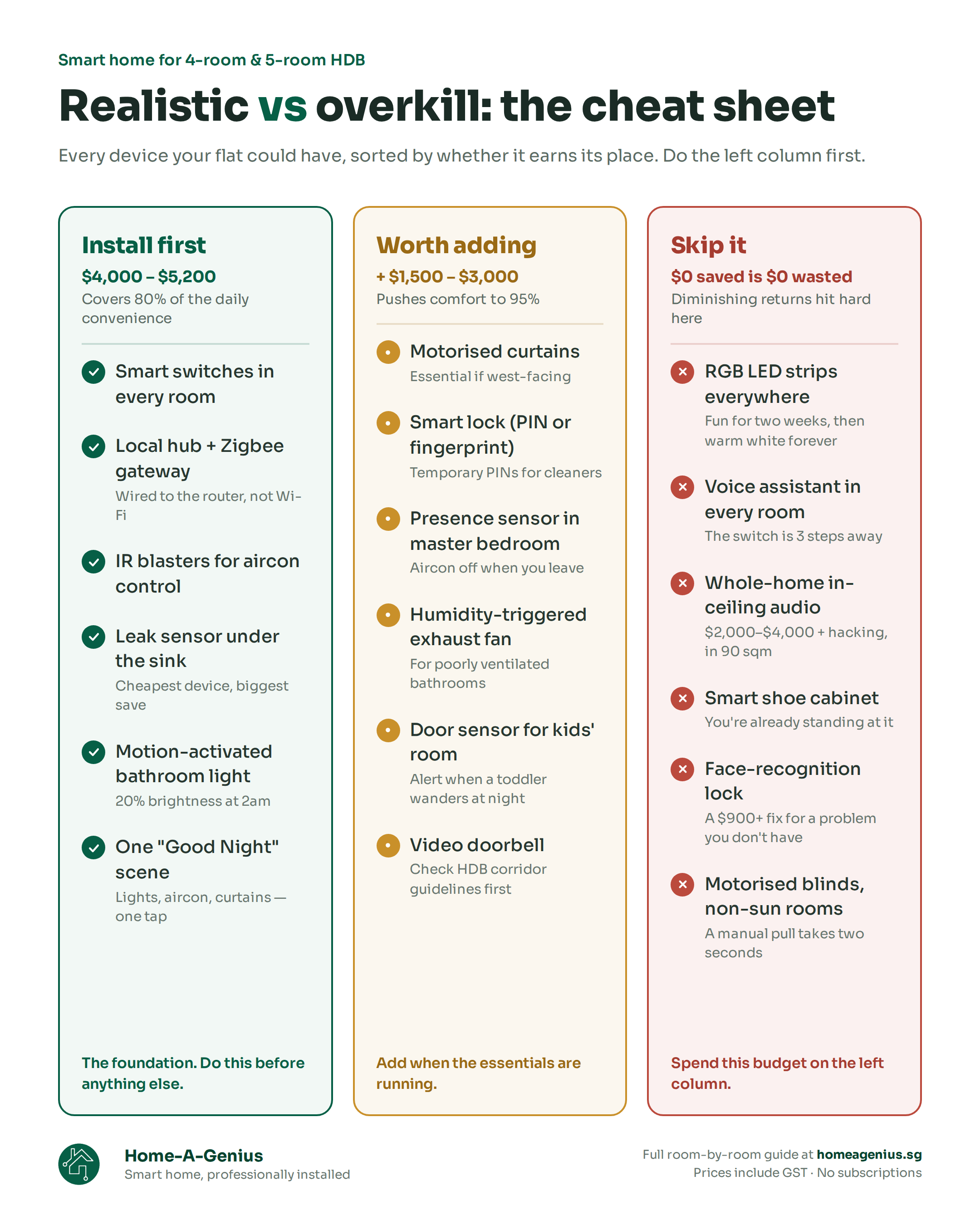
| Worth It in Every HDB | Worth It If You Have Budget | Overkill for Most |
|---|---|---|
| Smart switches (all lighting points) | Motorised curtains (especially west-facing) | RGB LED strips behind everything |
| Local hub + Zigbee gateway | Smart lock + video doorbell | Facial recognition door lock |
| IR blaster for aircon (per room) | Presence sensors for occupancy-based automation | Smart mirrors |
| Motion-activated bathroom light | Multi-zone aircon control | Whole-home audio in a 90 sqm flat |
| Leak sensor under kitchen sink | Fan speed control | Motorised shoe cabinet |
| "Good Night" / "I'm Leaving" scenes | Door sensors on bedrooms | Voice control in every room |
The left column costs $4,000-$5,200 and covers 80% of the daily convenience. The middle column adds $1,500-$3,000 and pushes comfort to 95%. The right column is where diminishing returns hit hard.
Room-by-Room: 4-Room HDB
This is where it gets practical. For each room: what to install, what's optional, and what's overkill.
Living Room
Install: Smart switches for all lighting points (typically 3-4 gang switches), one IR blaster for aircon control, one motion sensor near the entrance.
Optional: Motorised curtains. If your living room faces west, this is borderline essential: curtains that close automatically against the afternoon sun reduce your aircon load and protect furniture from UV. If you don't face west, it's a comfort upgrade, not a necessity.
Overkill: RGB LED strips behind the TV or under the sofa. Ambient lighting scenes for "movie mode." These are fun for about two weeks, then you'll just use the normal lights. If you want mood lighting, a dimmable warm-white switch does the job without the gimmick.
Ballpark: $1,200-$2,000
Kitchen
Install: A leak sensor under the sink (the cheapest device in your entire setup, and the one most likely to save you thousands in water damage). A smart plug for the rice cooker or air fryer, set to auto-off after a timer.
Optional: Smart switch for the kitchen ceiling light. Most 4-room kitchens have a single fixed light, so a $15 smart switch covers it. Not glamorous, but it joins your "I'm Leaving" scene so you never wonder if you left the kitchen light on.
Overkill: Smart lighting in the kitchen beyond the one ceiling point. Under-cabinet LED strips that change colour. Smart fridge monitoring. Your kitchen works fine without any of this.
Ballpark: $150-$400
Master Bedroom
Install: Smart switches for lighting, IR blaster for aircon control. This room benefits the most from automation because you use it at a predictable time every single night. A "Good Night" scene that dims lights, sets aircon to 25°C, and closes curtains is the single highest-satisfaction automation in any HDB flat.
Optional: Motorised curtains (high ROI for sleep quality: wake up to natural light instead of an alarm). A presence sensor if you want aircon to turn off automatically when you leave the room.
Overkill: Smart mirrors. Wake-up light simulations (just open the curtains). Elaborate mood lighting scenes you'll configure once and never touch again.
Ballpark: $1,000-$2,200
Common Bedroom / Kids' Room
Install: Smart switches for lighting. That's it for most households. If your kid is young, the switches join whole-home scenes and you're done.
Optional: A door sensor, useful if you want a notification when a toddler leaves the room at night. An IR blaster if this room has its own aircon unit.
Overkill: Full climate automation for a room that's empty 16 hours a day. Motion sensors when a light switch is within arm's reach of the bed. Basically, don't spend $800 automating a room someone sleeps in and nothing else.
Ballpark: $300-$800
Bathroom / Toilet
Install: Motion-activated light. This is the single highest quality-of-life upgrade for nighttime use. You stumble to the toilet at 2am, the light comes on at 20% brightness (enough to see, not enough to wake you up fully), and turns off 3 minutes after you leave. No fumbling for switches, no blinding yourself.
Optional: A humidity sensor to trigger the exhaust fan automatically. Useful if your bathroom has poor ventilation.
Overkill: Smart showers. Smart toilet seats. Humidity-triggered exhaust in a BTO flat where the exhaust system already works fine.
Ballpark: $100-$300
Main Door Area
Install: Nothing is mandatory here if budget is tight. But if you're going to spend on one "nice to have," a smart lock is it. Keypad or biometric, no more fumbling for keys, no "did I lock the door" anxiety, and you can issue temporary PINs for cleaners or visitors.
Optional: A video doorbell (check HDB corridor restrictions first: installations along common corridors have guidelines). A door sensor that triggers a "Welcome Home" scene (hallway lights on, aircon starts).
Overkill: Facial recognition locks for a 4-room flat. You have maybe 4 household members. Fingerprint or PIN is faster and cheaper. A $900+ face-unlock lock is solving a problem that doesn't exist at this scale.
Ballpark: $600-$1,200
Storeroom / DB Area
Install: This is where your hub and network gateway live, not a room you automate. One 13A socket for the hub, and ideally an ethernet connection from your router to keep the hub on a wired connection rather than Wi-Fi.
If your flat has a bomb shelter between the hub and a bedroom, you'll likely need one smart plug in the corridor acting as a Zigbee signal repeater. The bomb shelter's reinforced concrete walls and steel blast door are designed to withstand explosions, which also makes them a signal black hole for wireless devices. One repeater in the corridor outside the shelter solves it permanently.
Ballpark: $0 (part of hub setup)
What Changes for a 5-Room HDB
You don't need a completely different system. You need slightly more of the same.
Extra bedroom zone. One more set of smart switches and possibly another IR blaster if the third bedroom has its own aircon. Add $300-$800.
Longer Zigbee mesh. A 5-room flat stretches the distance between the hub and the furthest room. In most cases, the mains-powered smart switches in between already act as Zigbee repeaters, so coverage is fine. If you have a long L-shaped corridor, one smart plug halfway solves it.
Second aircon zone. Most 5-room flats run two aircon systems (living + bedrooms). You'll need a second IR blaster. With two-zone control, you get automations like "turn off the living room AC when everyone moves to the bedroom after 10pm."
Do you need a second Wi-Fi access point? For a standard 5-room, usually no. For an EA (executive apartment) or maisonette with thicker walls or split levels, yes. Home-A-Genius models Wi-Fi coverage from your floor plan before installation, so this is assessed upfront, not discovered after move-in.
The 4-Room vs 5-Room Budget
These are real numbers for professional integration, not DIY estimates. Includes consultation, hardware, installation, automation programming, and aftercare. All prices include GST at 9%.
| 4-Room HDB | 5-Room HDB | |
|---|---|---|
| Essentials (switches, hub, gateway, 1-zone AC) | $4,000-$4,550 | $4,550-$5,200 |
| + Motorised curtains (1-2 windows) | +$800-$1,500 | +$1,200-$2,000 |
| + Smart lock & video doorbell | +$600-$1,200 | +$600-$1,200 |
| + Full climate (multi-zone AC, fan control) | +$500-$1,000 | +$800-$1,500 |
| Realistic total | $5,500-$7,500 | $6,500-$9,000 |
For reference, Home-A-Genius's Standard Genius 2.0 package ($4,550 including GST) covers a 4-room flat with up to 12 lighting points and two-zone aircon. The Supreme Genius 2.0 ($5,200 including GST) covers a 5-room with up to 18 lighting points plus curtain and fan control. Both include the local hub, Zigbee gateway, automation programming, up to 2-year warranty (parts and labour), and lifetime remote support. No subscriptions.
Lighting point counts and aircon zone allocations per package are based on internal Home-A-Genius specifications. Final coverage is confirmed during consultation based on your actual floor plan.
The Overkill Hall of Fame
These keep showing up in YouTube tours and Qanvast features. Let's be honest about them.
Voice control in every room. You're in a 90 sqm flat. The light switch is 3 steps away. "Hey Google, turn on the bedroom light" takes longer to say than it takes to tap the switch. Voice is useful for hands-free moments (cooking, carrying a baby), but dedicated voice assistants in every room is a solution looking for a problem. One in the living room or kitchen is plenty.
Whole-home audio. In-ceiling speakers across a 4-room flat cost $2,000-$4,000 and require hacking. A $150 Bluetooth speaker on the kitchen counter and your TV soundbar in the living room cover the same ground. Your flat is small enough that you can hear the living room speaker from the kitchen anyway.
Smart shoe cabinet. Yes, these exist. Motorised doors that open when you approach. In a 4-room HDB where the shoe cabinet is beside the front door you're already standing at. This is the textbook definition of overkill.
RGB everything. LED strips behind the TV, under the bed frame, inside wardrobes, along the ceiling cove. Looks incredible on Instagram. In daily life, you'll use "warm white at 60%" every single night and never touch the colour wheel again.
Automated blinds in non-sun-facing rooms. Motorised curtains make sense when the sun is attacking your living room at 3pm. For a north-facing bedroom where you open the curtains once in the morning and close them at night, a manual pull takes two seconds. Spend the $800 elsewhere.
If the essentials are done and you still have budget, go wild. Some of these are genuinely fun. But do the foundation first: switches, hub, climate, and one really good automation scene that makes you smile every night when you hit "Good Night" and the entire flat responds.
Founder's Take
"The best 4-room HDB setups we've done weren't the most expensive ones. They were the ones where every device earned its spot."
I've installed systems in 4-room flats that cost $4,500 and it works beautifully, and systems in identical flats that cost $9,000 and half the features go unused. The difference is planning, not budget.
The room-by-room approach works because it forces you to justify every device. "What does this sensor actually do for this room?" If the answer is "not much," skip it. You can always add it in 6 months when you've lived with the system and know what you actually want.
One more thing: don't compare your HDB setup to a landed home showcase. Those are different projects with different needs. A 4-room flat that responds to your daily routine with 30 well-placed devices is a better smart home than a landed property with 80 devices and 40 of them collecting dust.
Start with what matters. Add what earns its place. Skip the rest.
Cheryl, COO, Home-A-Genius
FAQ
Can I start with just switches and a hub, then add curtains and cameras later?
Yes. The Home-A-Genius system is modular by design. Start with lighting and a hub ($4,000-$4,550 including GST), then add motorised curtains, sensors, locks, or cameras whenever you're ready. Each new device pairs to your existing hub with zero rewiring. The only thing you can't easily add later is the wiring infrastructure, so if you're renovating, get that done now.
What if my flat has no neutral wires?
Older HDB flats often lack neutral wires at switch points. Home-A-Genius handles this with wireless smart switches that bind directly to the lighting circuit, no hacking required. If you're renovating, pulling neutral wires during the electrical first fix is cheap ($500-$1,200) and future-proofs every switch location.
Do I really need a smart home for a small HDB?
"Need" is the wrong framing. Nobody needs motorised curtains. The question is whether the daily convenience is worth $4,000-$6,000 over the 10+ years you'll live there. That's roughly $1.10-$1.60 per day for lights that respond to you, aircon that manages itself, and a flat that shuts down with one tap at bedtime. Most of our clients say it's the best money they spent in their renovation.
Will a smart home affect my HDB's resale value?
A cleanly installed system (hidden wiring, quality switches, local hub) signals a well-planned renovation to buyers. It won't add $30,000 to your valuation, but it makes your flat stand out in viewings. The bigger value is the years of daily comfort while you actually live there.
Is professional installation worth it for a small HDB?
A 4-room flat is small, but the technical considerations are the same: hub placement, Zigbee channel configuration, signal coverage through concrete walls, and automation logic that actually works together. A professional installer handles all of this in one session. If you've tried DIY and spent a weekend troubleshooting why the bedroom switch keeps dropping off, you already know the answer.
Book a free consultation, tell us your flat type, layout, and whether you're renovating. We'll map out what makes sense room by room, no obligation, no subscriptions.