Buying & Costs
How to Choose the Right Ceiling Fan for Your Smart Home? (2026) - What To Take Note
TL;DR:
- Almost any Singapore ceiling fan with an RF (433MHz) remote can be made smart with an RF blaster. Wi-Fi/Tuya fans work through Alexa or Google Home.
- Bluetooth-only fans (Haiku) and rolling-code fans (Vento, AeroAir) can't be integrated.
- The remote matters as much as the fan: look for individual speed buttons (1 to 6), separate on/off for fan and light, and separate colour temperature buttons. Avoid toggle up/down speed and combined on/off buttons - the system can't tell what state the fan is in.
- If you're buying new, PO Eco with an RF remote is the safest pick, and Dyson is the best premium option.
This guide covers
- The protocols
- The four integration methods
- Which brands work with which method, and how Home-A-Genius does it differently.
Why Smart Ceiling Fan Control Matters
Because an unconnected fan is a gap that you will notice every day:
- It can't join "Goodnight" or "Go Out" scenes
- It won't switch off automatically when the aircon starts
- It can't change speed based on room temperature or whether anyone is home
- You're always looking for the remote
When integrated rightly, the fan runs on presence sensors, schedules, voice and the same app as your lights, curtains and aircon.
What Protocol Does My Ceiling Fan Use?
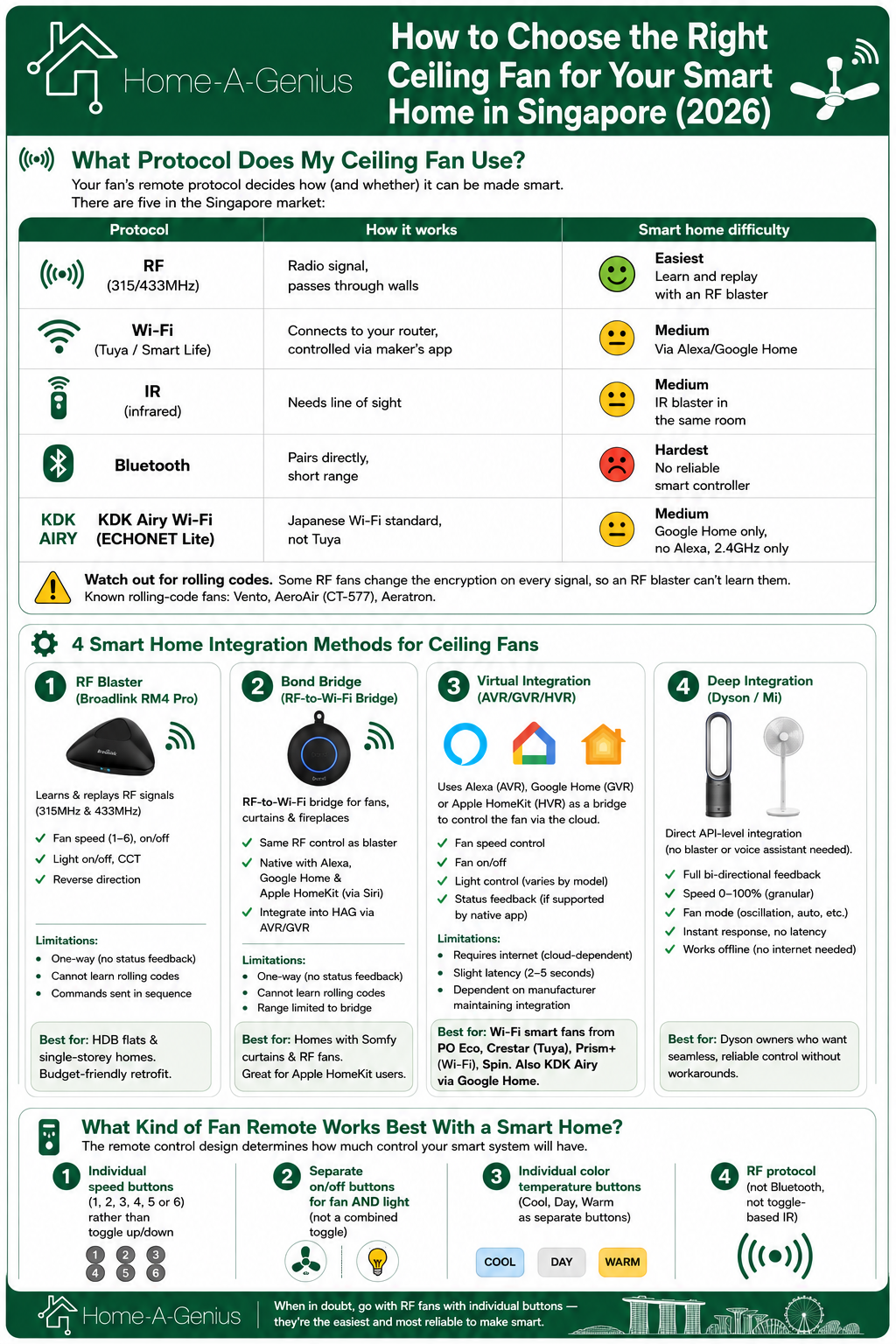
Your fan's remote protocol decides how (and whether) it can be made smart. There are five in the Singapore market:
| Protocol | How It Works | Smart Home Difficulty |
|---|---|---|
| RF (315/433MHz) | Radio signal, passes through walls | Easiest - learn and replay with an RF blaster |
| Wi-Fi (Tuya / Smart Life) | Connects to your router, controlled via maker's app | Medium - via Alexa/Google Home |
| IR (infrared) | Needs line of sight | Medium - IR blaster in the same room |
| Bluetooth | Pairs directly, short range | Hardest - no reliable smart controller |
| KDK Airy Wi-Fi (ECHONET Lite) | Japanese Wi-Fi standard, not Tuya | Medium - Google Home only, no Alexa, 2.4GHz only |
Watch out for rolling codes. Some RF fans change the encryption on every signal, so an RF blaster can't learn them. Known rolling-code fans: Vento, AeroAir (CT-577), Aeratron.
1. RF (Radio Frequency) Remote Control
The most common protocol in Singapore ceiling fans. RF remotes use radio signals (typically 315MHz or 433MHz) that pass through walls without line-of-sight.
Why it matters for smart homes: RF signals can be learned and replayed by smart controllers like the Broadlink RM4 Pro or Bond Bridge, making RF fans the easiest to retrofit into a smart home.
Brands using RF: Fanco, Bestar, PO Eco (PointOne), Fanztec, Prestige, Acorn, Alaska, Samaire, Efenz, Alkova, Spin, Fanz, Prism+
Watch out for rolling codes: Some fans use encrypted rolling codes that change with every signal. These CANNOT be learned by RF blasters. Known rolling-code fans: Vento, AeroAir (CT-577), Aeratron.
2. Wi-Fi Smart Fans (Tuya/Cloud-Based)
Wi-Fi fans connect directly to your home network and are controlled via a manufacturer app (usually Tuya or Smart Life). They offer bi-directional feedback: if someone uses the physical remote, the app updates to show the real status.
Pros:
- True status feedback (bi-directional)
- Native app control with scheduling
- Can connect to Google Home and Alexa
- LED light dimming and colour temperature control built in
Cons:
- Adds to Wi-Fi network congestion (alongside your phones, tablets, TVs, etc.)
- Cloud-dependent: if the vendor's server goes down, you lose control
- Each brand has its own proprietary app
- Higher electricity consumption than RF-only fans
Brands using Wi-Fi/Tuya: PO Eco (PointOne) Typhoon series, Crestar Airis+/Altis+ (Tuya), Fanco Infinity-iD (newer Tuya versions)
3. IR (Infrared) Remote Control
IR requires line-of-sight between the remote and the fan's receiver. Less common in modern ceiling fans, but still found in some KDK and older Haiku models.
Brands using IR: KDK (DC fans), Haiku (older models)
Smart home limitation: IR blasters must be positioned with direct line-of-sight to the fan. Cannot pass through walls. However, since the blaster is typically ceiling or shelf-mounted in the same room, this is usually manageable.
4. Bluetooth Remote Control
A newer protocol using radio waves at 2.4GHz. Bluetooth remotes pair directly with the fan, but range is limited, and smart home integration is extremely difficult.
Brands using Bluetooth: Crestar (newer models), Haiku (current generation)
Smart home limitation: Bluetooth fans are the hardest to integrate. No readily available smart controller can reliably replicate Bluetooth signals. These fans typically require virtual integration (AVR/GVR) through their companion app if they support Alexa or Google Home.
5. KDK Airy Wi-Fi (ECHONET Lite)
KDK's latest Airy series uses Wi-Fi, but runs on the ECHONET Lite protocol, a Japanese standard. This is NOT the same as Tuya Wi-Fi fans.
- Smart home limitation: KDK Airy connects to Google Home, but does NOT have Alexa integration. The fan only supports 2.4GHz Wi-Fi. Integration into third-party smart home platforms requires virtual integration via Google Home.
4 Smart Home Integration Methods for Ceiling Fans
Method 1: RF Blaster (Broadlink RM4 Pro)
The Broadlink RM4 Pro learns and replays RF signals (315MHz and 433MHz) from your fan's original remote. One blaster can control multiple fans in the same room, or even across walls (RF passes through concrete).
What you get:
- Fan speed control (individual speeds: 1, 2, 3, 4, 5, 6)
- Fan on/off
- Light on/off
- Light colour temperature (if remote has separate CCT buttons)
- Reverse direction (if remote supports it)
Limitations:
- One-way communication: if someone uses the physical remote, the smart home app won't know the current state
- Signals sent in sequence (cannot send two commands simultaneously)
- Cannot learn rolling codes or encrypted RF
- Light brightness adjustment only works if the remote has distinct brightness buttons (not toggle)
Best for: HDB flats and single-storey apartments where one blaster covers all fans. Budget-friendly retrofit option.
Method 2: Bond Bridge (RF-to-Wi-Fi Bridge)
The Bond Bridge is a dedicated RF-to-Wi-Fi bridge designed specifically for ceiling fans, curtains, and fireplaces. It learns RF signals and exposes them as smart home commands through its own API.
What you get:
- Same RF control capabilities as Broadlink
- Native integration with Alexa, Google Home, and Apple HomeKit (via Siri Shortcuts)
- Cleaner setup for fan-specific automations
- Can be integrated into the HAG platform via AVR/GVR
Limitations:
- One-way communication (no status feedback)
- Cannot learn rolling codes
- Range limited to RF line-of-sight from the bridge
Best for: Homes with Somfy curtains AND RF ceiling fans (one device handles both). Also great for households already using Apple HomeKit.
Method 3: Virtual Integration (AVR/GVR/HVR)
If your ceiling fan connects to Alexa (AVR), Google Home (GVR), or Apple HomeKit (HVR), it can be brought into the Home-A-Genius platform through virtual integration. The HAG system sends commands through the voice assistant platform to control the fan.
What you get:
- Fan speed control
- Fan on/off
- Light control (varies by model)
- Status feedback (if the fan's native app reports state to Alexa/Google)
Limitations:
- Requires internet (cloud-dependent path)
- Slight latency (2-5 seconds) compared to local RF
- Dependent on the fan manufacturer maintaining their Alexa/Google integration
Best for: Wi-Fi smart fans from PO Eco, Crestar (Tuya), Prism+ (Wi-Fi version), Spin. Also KDK Airy via Google Home.
Method 4: Deep Integration (Dyson / Mi)
For select brands, Home-A-Genius has direct API-level integration that bypasses the need for RF blasters or virtual assistants entirely.
Currently supported: Dyson Smart Fans (TP07, TP09, Purifier Big+Quiet Formaldehyde), Mi Smart Standing Fan 2
What you get:
- Full bi-directional feedback
- Speed control 0-100% (granular, not just preset speeds)
- Fan mode (oscillation, auto mode)
- No reliance on IR blasters or smart plugs
- Instant response, no latency, no internet required
Best for: Dyson owners who want seamless, reliable control without workarounds.
What About Matter and Thread for Ceiling Fans?
Should I wait for a Matter ceiling fan? No. In Singapore in 2026, an RF blaster or virtual integration is more practical and cheaper than waiting for Matter-native fans.
Matter is the new universal smart home standard backed by Apple, Google, Amazon, and Samsung. In 2026, Matter-compatible ceiling fan controllers are starting to appear (like the Inovelli White Series Fan/Light Canopy Module using Matter over Thread).
Current state of Matter for ceiling fans:
- Very few Matter-certified ceiling fans exist globally
- The Inovelli VTM35-SN fan switch supports Matter over Thread, but requires a neutral wire and a Thread Border Router (e.g., Google Nest Hub, HomePod Mini, or Aqara Hub)
- Matter fan control is limited to basic on/off and speed presets
- No Singapore ceiling fan brand currently ships with native Matter support
- The Consciot Smart Ceiling Fan is one of few CSA-certified Matter fans (certified May 2025)
Our recommendation: For Singapore homes in 2026, RF blaster or virtual integration remains more practical and cost-effective than waiting for Matter-native fans. However, if you're building a new home and want to future-proof, ensure your DB has neutral wires at all switch points, so that Matter-compatible fan controllers can be installed later without rewiring.
What Kind of Fan Remote Works Best With a Smart Home?
The remote control design determines how much control your smart system will have.
Here's what to look for:
The Ideal Smart-Home-Friendly Remote Has:
- Individual speed buttons (1, 2, 3, 4, 5 or 6) rather than toggle up/down
- Separate on/off buttons for fan AND light (not a combined toggle)
- Individual colour temperature buttons (Cool, Day, Warm as separate buttons)
- RF protocol (not Bluetooth, not toggle-based IR)
The Worst Remotes for Smart Homes:
| Remote Type | Why It's a Problem |
|---|---|
| Toggle speed (up/down arrows) | The system can't know what speed the fan is currently on |
| Combined on/off button | Sending "off" to a fan that's already off turns it on |
| Rolling-code RF | Encryption changes every press, can't be learned |
| Bluetooth-only | No smart controller can reliably copy the signal |
- Toggle-based speed (up/down arrows): The system can't know which speed the fan is currently at
- Combined on/off: If on and off are the same button, sending "off" when the fan is already off will turn it ON.
- Rolling code RF: Changes encryption with every signal, cannot be learned
- Bluetooth-only: No smart controller can reliably replicate Bluetooth fan signals
Real Example: Why Dyson's Remote Is Bad for RF Integration
Dyson's standard remote has no specific on/off button, no distinct speed buttons, and uses IR. This makes it impossible to integrate via Broadlink alone. That's why Home-A-Genius developed direct API integration for Dyson fans, bypassing the remote entirely.
The Home-A-Genius Difference: How We Handle Ceiling Fans
Most smart home providers offer you one method (usually a Tuya app or a basic IR blaster) and call it a day. Here's how we approach ceiling fans differently:
1. Multiple Integration Paths
We don't force you into one solution. Depending on your fan brand and what level of control you want, we select from:
- RF Blaster (local, fastest response)
- Bond Bridge (for RF fans + Somfy curtains in one device)
- AVR/GVR Virtual Integration (for Wi-Fi/Tuya fans)
- Deep Integration (for Dyson and Mi)
2. Unified Control Regardless of Method - One App For Everything
Whether your fan uses RF, Wi-Fi, or deep integration, it appears in the same Home-A-Genius app alongside your lights, aircon, curtains, and locks. One app, one voice command, one automation engine.
3. Less Router Congestion.
Instead of connecting each Wi-Fi fan individually (adding 3-5 devices to your already-crowded router), we use a single RF blaster to control multiple fans. One device replaces many, keeping your home network clean and fast.
4. A Workaround For The Status Problem
The biggest complaint with RF integration is that the system doesn't know the fan's real state if someone uses the physical remote. Our solution: a 2-step automation triggered by the smart switch. When you press the physical wall switch to power the fan, the system automatically sends an RF command to set the fan to your family's preferred default speed. This ensures the app always reflects the correct state.
5. Scene Integration
Once your fan is in the system, it participates in scenes like any other device:
- "Goodnight": Fan speed 2, lights off, aircon 25°C
- "Go Out": Everything off including fans
- "Movie Night": Fan speed 1 (quiet), lights dim to 20%
- "Welcome Home": Fan speed 3, living room lights on
6. Sensor Automations
Pair your ceiling fan with our mmWave + PIR presence sensors:
- Fan turns on automatically when someone enters the room
- Fan turns off after 5 minutes of no presence
- Fan speed adjusts based on temperature sensor readings
- Fan turns off when aircon is activated (and vice versa)
Balcony and Outdoor Fans: Special Considerations
Singapore homes often have ceiling fans in covered balconies or patios. Smart controllers like the Broadlink RM4 Pro are NOT weatherproof.
Our solution: Keep the RF blaster indoors (inside the nearest room to the balcony). Since RF signals pass through walls, the blaster can control the outdoor fan from inside. For Wi-Fi fans on the balcony, ensure your outdoor area has adequate Wi-Fi coverage from a ceiling-mounted access point.
Frequently Asked Questions
Can any ceiling fan be made smart?
Most ceiling fans with RF 433MHz remotes can be integrated. Fans with rolling codes (Vento, AeroAir), Bluetooth-only control (Haiku), or proprietary encrypted protocols cannot. Wi-Fi/Tuya fans can be integrated through virtual integration if they support Alexa or Google Home.
Will making my fan smart void the warranty?
No. Smart integration doesn't modify the fan itself. RF blasters simply replicate the remote's signals. Virtual integration uses the fan's own app/platform. No physical modification to the fan is needed.
Can I still use the original remote after smart integration?
Yes. The original remote continues to work normally. However, using the physical remote means the smart system won't know the fan's current state (for RF-controlled fans). We recommend using voice or app control for consistency.
How many fans can one RF blaster control?
One Broadlink RM4 Pro can control all RF fans within its range (typically covers an entire single-storey HDB flat or apartment). For landed properties with multiple floors, you may need one blaster per level.
What if my fan brand isn't listed in your compatibility guide?
Send us a photo of your remote. If it's RF-based (no line-of-sight needed, passes through walls), there's a strong chance we can integrate it. We regularly test new models and update our compatibility list.
Is it better to buy a native Wi-Fi smart fan or retrofit my existing fan?
It depends on your priority. A native Wi-Fi fan (like PO Eco or Crestar Tuya) gives you bi-directional feedback and app control out of the box, but adds to network congestion and depends on the manufacturer's cloud. Retrofitting an RF fan with a blaster gives you local control, less network load, and independence from any manufacturer's server. For most smart homes, retrofitting is more reliable long-term.
What's the difference between Broadlink and Bond Bridge?
Both learn and replay RF signals. Broadlink is more versatile (handles IR + RF, controls aircons/TVs too), but requires our system to orchestrate commands. Bond Bridge is fan/curtain-specific with direct Alexa/Google/HomeKit support, making it easier for standalone use. In a HAG system, Broadlink is typically preferred for its flexibility.
Can I control my ceiling fan by voice?
Yes. Once integrated, you can say things like:
- "Turn on the bedroom fan"
- "Set living room fan to speed 3"
- "Turn off all fans"
- "Set fan to low/medium/high"
Voice commands work through our built-in AI voice assistant, or through Google Home and Alexa if connected.
Does smart fan control work without internet?
RF-based control (Broadlink, Bond Bridge) and Deep integration runs locally and works without internet. Virtual integration (AVR/GVR) requires internet, since commands route through Alexa/Google's cloud. Our core automation engine runs locally, so RF-controlled fans continue to operate on schedules and scenes even during an internet outage.
Choosing Your Ceiling Fan: A Decision Framework
If you're renovating or buying a new fan specifically for smart home integration, here's our recommendation:
Best choice for smart home: PO Eco (PointOne) with RF remote
- Individual speed buttons
- Separate CCT buttons for light colour
- Separate on/off for fan and light
- RF protocol (works with Broadlink from anywhere in the home)
- Also has Wi-Fi for native app control as backup
Best premium choice: Dyson Smart Fans
- Full deep integration with bi-directional feedback
- 0-100% speed control (granular)
- Premium build quality and air purification
- No RF blaster or bridge needed
Best budget choice: Fanco (RF models)
- Reliable RF remotes that integrate cleanly
- Wide model range for every room size
- Good airflow performance
- Affordable price point
Avoid for smart homes: Vento, AeroAir (rolling codes), Haiku (Bluetooth), Decken (unknown protocol), Crestar ValueAir 5 (incompatible)
Summary: Integration Priority Flow
When determining how to integrate your ceiling fan, follow this order:
- Deep Integration (if fan is Dyson. direct API control)
- RF blaster (if fan has RF 433MHz remote without rolling codes)
- Virtual Integration (if fan has Google/Alexa support)
- Bond Bridge (if you also need Somfy curtain integration)
- Not compatible (rolling codes, Bluetooth-only, or unknown encrypted protocol)
Ready to Integrate Your Ceiling Fan?
Drop by our Experience Centre at 1 Tampines North Drive 1, #01-20 T-Space, Singapore 528559 to see how we automate ceiling fans from PO Eco, Fanco, KDK, Dyson, and more. See the automations running live, test voice commands, and watch what happens when we cut the internet (spoiler: the fans keep working).
Bring your fan remote if you'd like us to test compatibility on the spot.
Frequently asked questions
Can I make my existing ceiling fan smart?
Yes, if your ceiling fan uses an RF remote control. A Bond Bridge or RF blaster can learn the fan's remote signals and integrate it into your smart home system, giving you app control, voice commands, and automation. Fans without RF remotes (like basic pull-chain or wall-switch-only fans) cannot be made smart without replacing the fan or adding a smart switch.
Which ceiling fan brands work with smart home systems in Singapore?
Most RF-controlled ceiling fans can be integrated via a Bond Bridge or RF blaster. Fans with Google Home or Alexa integration (like certain Crestar models) can also be connected through virtual integration. Some brands like KDK do not have Google or Alexa integration and cannot be connected via AVR/GVR. Always confirm compatibility before purchasing.
Can I control fan speed with a smart home system?
Yes. Through RF integration via Bond Bridge, you can control start, stop, fan speed levels, and light brightness. Through virtual integration (AVR/GVR), the same controls are available for fans with Alexa or Google Home compatibility. The level of speed control depends on what the fan's original remote supports.
What is the difference between RF and IR for ceiling fan control?
RF (radio frequency) signals can pass through walls and do not require line of sight, making them ideal for ceiling fans. IR (infrared) requires direct line of sight to the device. Most ceiling fans in Singapore use RF remotes, which means a Bond Bridge or RF blaster can control them from anywhere in the room, even if hidden behind furniture.
Can I automate my ceiling fan based on room occupancy?
Yes. By combining a presence sensor (mmWave or PIR) with fan integration, you can create automations that turn the fan on when someone enters the room and off when the room is empty. You can also schedule fan speeds based on time of day or tie them into scenes like Good Night that sets a low speed for sleeping.